


If you work with WordPress in 2026, you’ve probably noticed something strange.
You open the editor to write a post – and there’s an AI button waiting to finish your sentence. Your SEO plugin is suggesting headings, your form plugin is auto‑writing replies, and your client just asked, “Can’t we just let AI build the whole site?”
So where is this actually going?
Let’s walk through what AI is really doing to WordPress right now, what’s coming next, and how you can ride the wave instead of getting rolled by it.
The New Reality: WordPress Is Becoming AI‑Native
Until a couple of years ago, AI mostly meant “use ChatGPT in another tab and paste things in.” That’s over.
In February 2026, WordPress.com rolled out a native WordPress AI Assistant that lives directly in the editor, helping with content generation, rewriting, and structure. At the same time, the broader WordPress ecosystem is filling up with AI builders, AI SEO copilots, and AI design assistants.
The official WordPress roadmap literally includes a line called “AI Everywhere, With Clear Guardrails and Benchmarks.” That’s not a side project; it’s a strategic direction.
Table: How AI Is Already Embedded in WordPress
| Area | What AI Does Today | Example Tools / Initiatives |
| Content | Drafts, rewrites, tone adjustments inside the editor | WordPress AI Assistant, Jetpack AI, AI Power |
| SEO | Keyword suggestions, content scoring, schema hints | Rank Math Content AI, AI SEO modules |
| Design | Layouts, sections, and images generated on demand | Divi AI, SeedProd with AI, 10Web AI Builder |
| Support | Chatbots, FAQ automation, lead qualification | MxChat, AI-based support plugins |
| Dev Workflows | Code suggestions, test generation, automation | AI-powered dev tools, CodeWP‑style assistants |
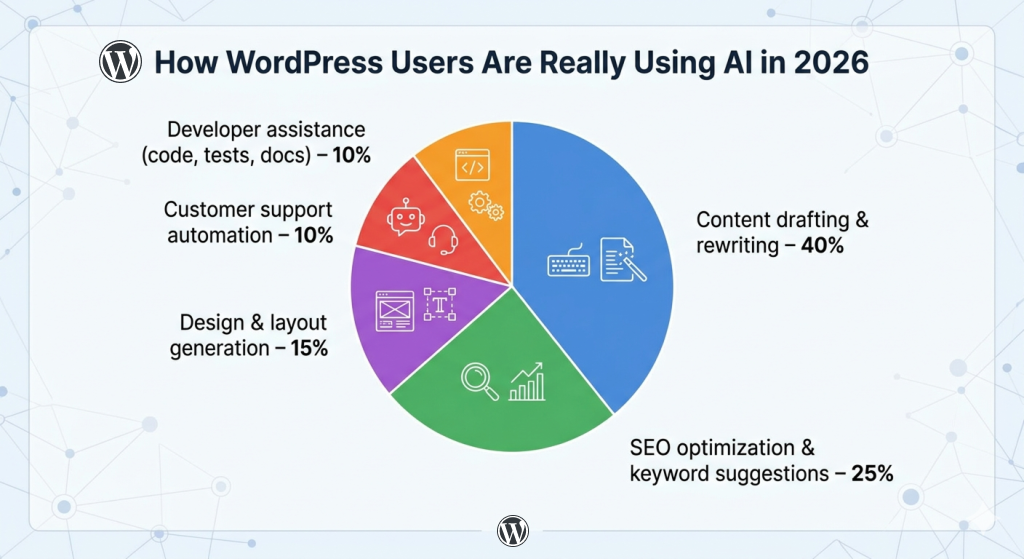
Most people start with AI for content because it’s the least scary.
AI Page Builders: From Blank Screen to Live Site in Minutes
A few years ago, building a website with WordPress meant picking a theme, tinkering with a page builder, and manually adjusting everything. Now?
Tools like 10Web’s AI Builder, SeedProd with AI, and Divi AI can generate entire homepages, landing pages, and even full sites from a short description of your business.
Developers report that AI‑assisted tools cut some build tasks by 40–60% – especially repetitive layouts and boilerplate sections.
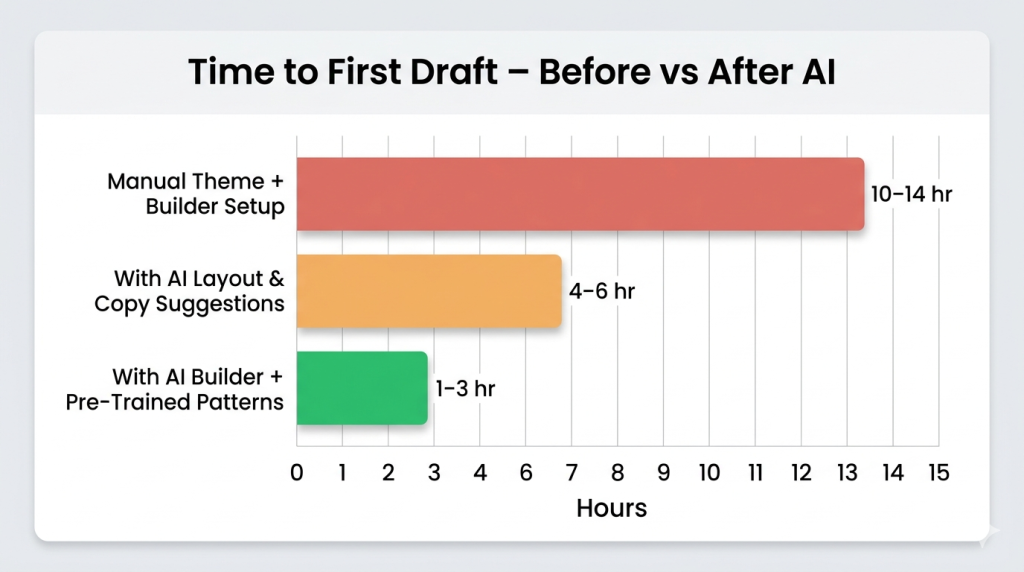
AI doesn’t remove customization work – but it radically compresses the ‘blank page’ phase.
AI, SEO, and the Rise of “Generative Engine Optimization”
AI isn’t just inside WordPress; it’s also changing how people find websites that use WordPress.
Search engines are shifting from ten blue links to AI‑generated answers, overviews, and recommendations, powered by generative models. That means your content is no longer just competing for ranking – it’s competing to be quoted and cited by AI systems.
Analysts are calling this Generative Engine Optimization (GEO): making your content more likely to be used inside AI answers.


Bullet: What GEO Looks Like for Websites Built on WordPress
- Clear, well‑structured answers near the top of articles (FAQ‑style blocks).
- Strong topical coverage instead of one thin post per keyword.
- Clean schema markup for products, articles, FAQs, how‑tos.
- Fast, mobile‑friendly pages with good Core Web Vitals.
AI tools like Rank Math Content AI now help identify long‑tail opportunities, suggest headings, and score relevance against search intent – directly inside WordPress. At the same time, more advanced teams are using Retrieval‑Augmented Generation (RAG) with their own content to power AI‑driven SEO research and topic planning.
Table: Old SEO Workflow vs AI‑Augmented Workflow
| Step | Traditional SEO on WordPress | AI‑Augmented SEO in 2026 |
| Keyword research | Manual tools, spreadsheets | AI suggests clusters, intent, gaps |
| Content outline | Built from scratch | AI drafts outline from brief + SERP patterns |
| Drafting | Writer starts at blank page | AI writes first draft, human refines |
| Optimization | Manual tweaks in plugin | Real‑time AI scoring, content suggestions |
| Iteration | Occasional updates | Continuous improvements as AI flags declines |
That doesn’t mean “no human work.” It means your time moves from typing to deciding.
Developers: At Risk or Just Getting Started?
This is the question everyone asks at meetups:
“Is AI going to replace WordPress developers?”
Data points to something more nuanced. WordPress still powers around 43–44% of the web, and AI‑related WordPress job postings jumped over 50% in 2025 as businesses looked for people who can combine dev skills with AI tools.
Developers using AI report 40–60% faster completion of repetitive tasks, not 100% automation. The work is shifting toward:
- Architecting systems that use AI responsibly.
- Connecting WordPress to external AI services via APIs.
- Building custom workflows (e.g., AI‑assisted editorial pipelines, support flows).
WordPress Core’s Direction: “AI Everywhere, With Guardrails”
This part gets overlooked, but it matters.
The official WordPress roadmap talks explicitly about embedding AI across the WordPress experience, with a focus on:
- Assisting site builders and contributors, not locking people into closed platforms.
- Keeping transparency and user control as core values.
There’s now a dedicated AI team in the project for WordPress working on things like:
- AI help for writing and editing inside the block editor.
- Smarter design suggestions and responsive styling guidance.
- AI support for documentation, support, and contributor workflows.
Where AI Helps – and Where It Still Fails
Here’s the part your clients don’t always see: AI is brilliant at patterns and volume; it’s still bad at your judgment, your brand, and your context.
Table: AI’s Strengths vs Its Blind Spots in WordPress
| Strengths | Blind Spots |
| Turning briefs into first drafts quickly | Nuanced brand voice across long content |
| Suggesting keywords, headings, FAQs | Understanding your internal politics, priorities, or legal constraints |
| Generating layouts and sections from prompts | Knowing what your specific audience truly cares about |
| Handling repetitive support questions | Dealing with edge cases, emotions, and strategy |
This explains why winning websites in 2026 tend to run on WordPress.
- Use AI to accelerate drafts, patterns, and repetitive tasks.
- Use humans to decide what’s worth publishing, what to prioritize, and how to position.
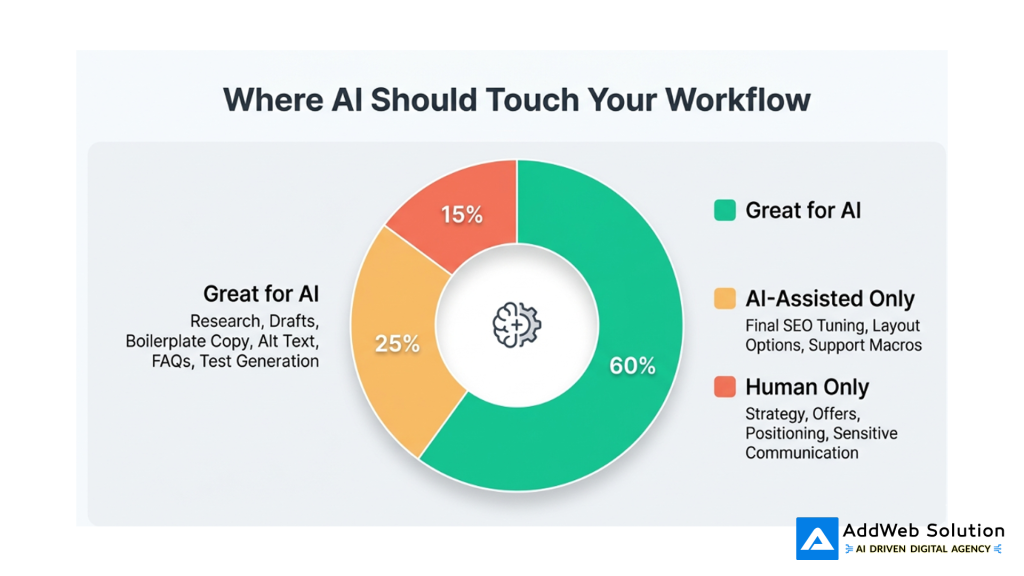
“Where AI Belongs in Your WordPress Workflow in 2026”
So What’s Next? A Practical 12–24 Month View
Based on current roadmaps and plugin trends, here’s where things are heading.
Expect These Changes to Become “Normal”
- Full AI copilots in the editor: You’ll ask, “Turn this section into a comparison table,” and it will.
- AI‑aware themes and patterns: Themes will ship with prompts like “Generate hero section for SaaS product” that pre‑wire design + copy.
- SEO that never sleeps: Your SEO plugin will continuously flag declining posts and suggest updates, not just show static scores.
- AI-powered personalization: Sites will increasingly show different blocks or copy depending on visitor segment, inferred with AI.
- Deeper integrations with external AI agents via things like Model Context Protocol and RAG, so your site can power chatbots, assistants, and internal tools.
What Smart WordPress Pros Are Doing Now
- Learning at least one AI content tool and one AI SEO or analytics tool in depth.
- Standardizing prompts, workflows, and “house style” so AI output stays on brand.
- Saving human energy for strategy, experiments, and UX rather than raw drafting.
- Keeping an eye on the WordPress AI team’s updates instead of only third‑party plugins.
Final Thought: AI Won’t Replace You – But AI‑Fluent WordPress Pros Might
When you strip away the hype, AI in WordPress isn’t a magic wand or a doomsday machine. It’s a leverage multiplier.
- Bad processes become faster ways to create bad sites.
- Thoughtful processes become faster, smarter, and more scalable.
The question for the next phase isn’t “Will AI replace developers for WordPress, writers, or site owners?” The more urgent question is:
“Will you be the person who knows how to point this new horsepower in the right direction?”
Because in 2026, the gap isn’t between people who use WordPress and people who don’t.
It’s between people who treat AI as a shortcut – and people who treat it as part of their craft.
Source URLs:
https://wordpress.com/blog/2026/02/17/wordpress-ai-assistant/
https://wordpress.org/about/roadmap/
https://www.youtube.com/watch?v=Uta3kgN1Sw0
Personalize user journeys with AI in WordPress

Pooja Upadhyay
Director Of People Operations & Client Relations
